How to customize OpenCC
Under the opencc folder are the OpenCC configuration files.
The Chinese and Japanese character conversion uses the following files:
| File | Conversion |
|---|---|
s2tw.json |
Simplified Chinese to Traditional Chinese (Taiwan standard) |
s2hk.json |
Simplified Chinese to Traditional Chinese (Hong Kong variant) |
t2s.json |
Traditional Chinese to Simplified Chinese |
s2t.json |
Simplified Chinese to Traditional Chinese, the first step of the Japanese conversion |
t2jp.json |
Traditional Chinese (Kyūjitai) to Japanese Shinjitai |
jp2t.json |
Japanese Shinjitai to Traditional Chinese (Kyūjitai) |
jp2t.json is used as an extra normalization step in front of the Chinese conversions, so Japanese Shinjitai input can also match the Chinese entries. It is applied as a separate conversion chain whose results are merged with the plain one; therefore, it can only add candidates and never replace a plain conversion result.
How to specify other configuration files?
-
Create a custom file, such as
custom.txt: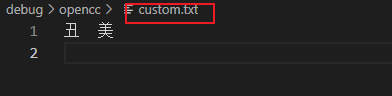
-
Modify the
*.jsonfile and add the newcustom.txtto the configuration: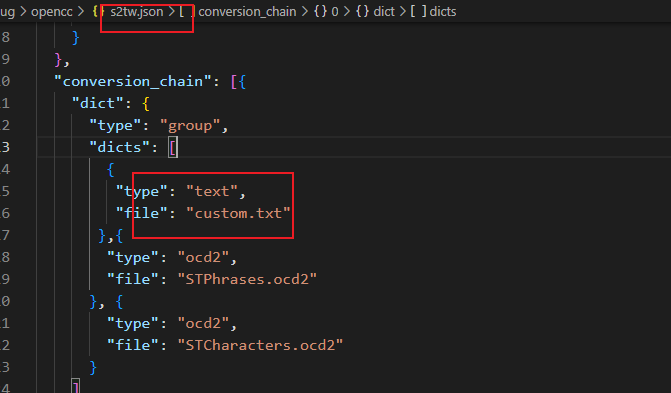
-
Searching for
丑in GoldenDict-ng will also show the result of美.
Any other valid OpenCC configuration solutions should also work here.